


MALIIGAZA
MALIIGAZA 5V USB LED Dimmer Cable, 1.5m Inline 3-Button Controller with 6 Brightness Levels and 60s Timer
MALIIGAZA 5V USB LED Dimmer Cable, 1.5m Inline 3-Button Controller with 6 Brightness Levels and 60s Timer
Available offer
MA10OFF
Save 10% on eligible products. One use per customer.
Enter at checkout. Eligibility and discount combinations are confirmed at checkout.
Couldn't load pickup availability
Simple Controls. Beautifully Adjustable Light.
Take control of your 5V LED lighting with the MALIIGAZA USB LED Dimmer. This compact 1.5m inline controller combines 6-level brightness adjustment, smooth stepless dimming and a convenient 60-second delayed-off timer. Choose from black or white designs, with a brightness memory option available on the White Pro version.
Make Every Light Work Better for Your Space
Sometimes, the smallest lighting accessory makes the biggest difference.
Bright lighting is useful when you are working. Softer illumination feels more comfortable when you are relaxing. With the MALIIGAZA USB LED Dimmer Cable, adjusting the atmosphere is as simple as pressing a button.
Designed for compatible DC 5V single-color LED strips and small LED lights, this convenient inline dimmer brings intuitive brightness control to everyday lighting without complicated programming or wireless setup.
Why Choose This USB LED Dimmer?
Two Ways to Adjust Brightness
Choose from 6 brightness levels or fine-tune the light continuously with a simple long press.
60-Second Delayed Off
Hold the power button to activate the delayed-off function, giving you a little extra time before the lights switch off.
Compact Inline Control
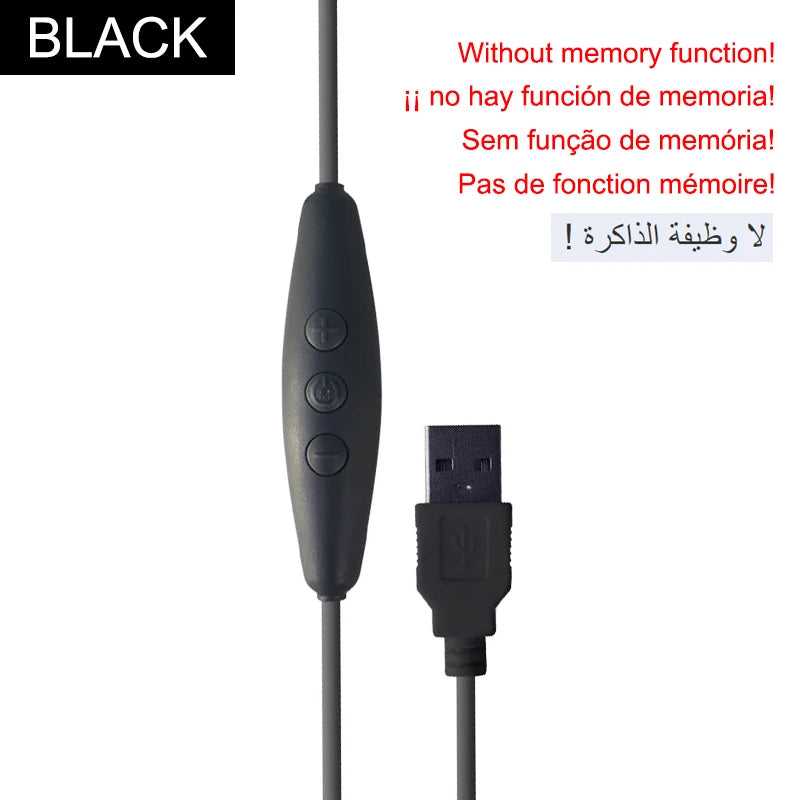
A minimalist three-button controller with a 1.5m cable, available in black and white to complement your lighting setup.
Brightness Memory on Pro
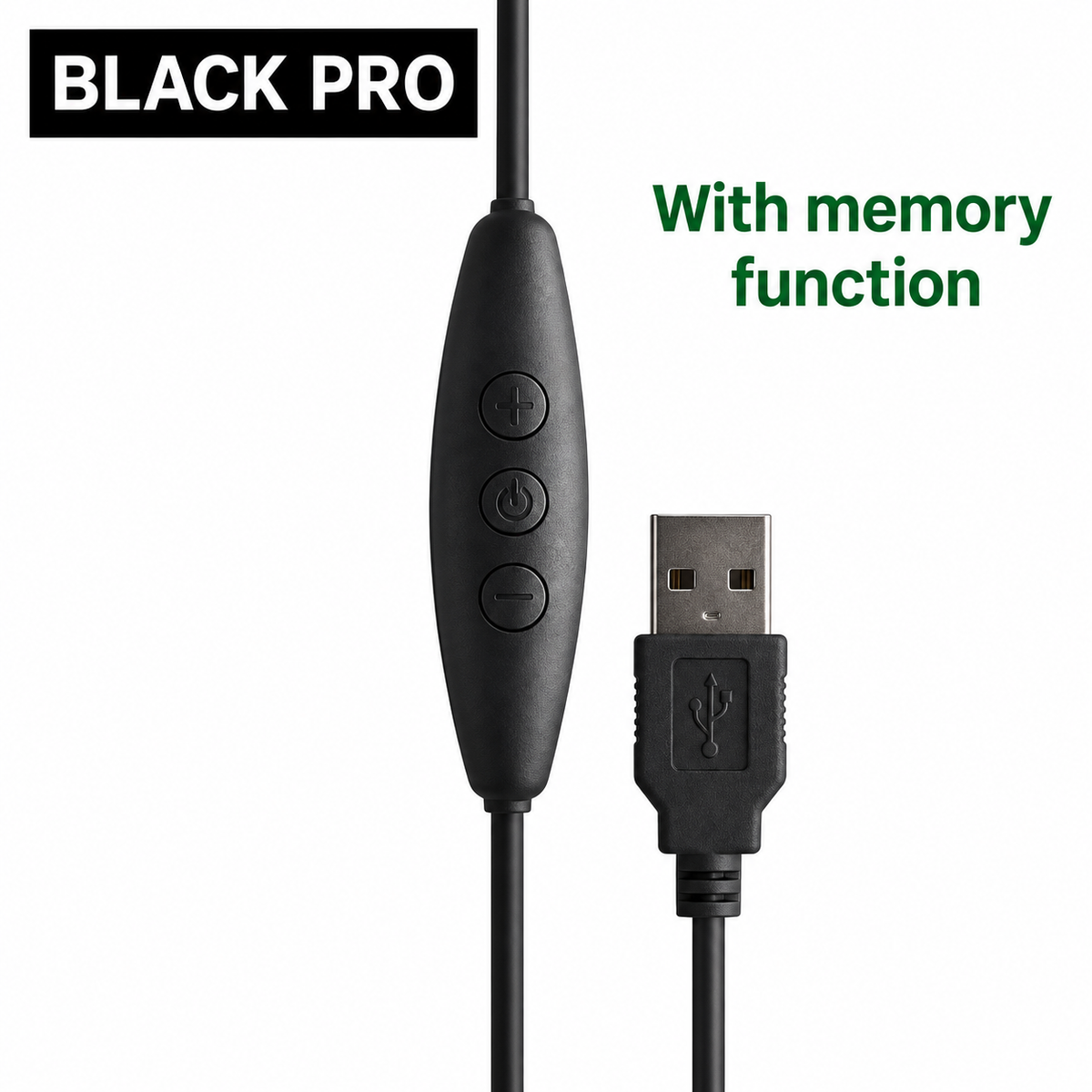
The White Pro version can restore the previous brightness setting when the light is switched back on using the controller.
1. Three Buttons. Complete Everyday Control.
No complicated settings or multiple menus. The USB inline dimmer uses three clearly defined buttons for everyday lighting adjustments.
Increase Brightness
Decrease Brightness
Power & Timer
| Button | Short Press | Long Press |
|---|---|---|
| + | Brightness up, one level | Smooth brightness increase |
| - | Brightness down, one level | Smooth brightness decrease |
| ON/OFF | Turn light on or off | Activate 60-second delayed off |
2. Six Brightness Levels + Stepless Dimming
Different moments call for different lighting. This 5V PWM dimmer offers two convenient adjustment methods:
Quick Brightness Adjustment
Short press the + or - button to move between 6 preset brightness levels. Ideal when you want quick, repeatable adjustments.
Smooth, Continuous Dimming
Press and hold + or - to adjust brightness progressively, giving you more precise control over the final lighting effect.
3. Convenient 60-Second Countdown Timer
Need the lights to stay on briefly before switching off?
Simply press and hold the ON/OFF button to activate the 60-second delayed-off function. The connected light will switch off automatically after the countdown.
An Extra Touch of Convenience
Useful for bedside lighting, decorative displays and other situations where you prefer a short delay instead of turning the light off immediately.
4. Regular and Pro Versions
Choose the version that matches your everyday lighting preferences.
| Feature | Regular | White Pro |
|---|---|---|
| DC 5V operation | Yes | Yes |
| Three-button control | Yes | Yes |
| Six brightness levels | Yes | Yes |
| Stepless dimming | Yes | Yes |
| 60-second delayed off | Yes | Yes |
| Brightness memory | Not specified | Included |
Note: Brightness memory is specified for the White Pro version only. Refer to the selected variant for its color and configuration.
5. High-Frequency PWM Brightness Control
The USB LED dimmer is specified with 4K high-frequency PWM control, designed to provide smooth brightness adjustment for compatible LED lighting.
Actual visible or camera-detected flicker can vary depending on the connected LED light, USB power source, brightness setting and recording equipment. A completely flicker-free result cannot be guaranteed for every installation.
Compatibility: Designed for Simple 5V LED Lighting
Compatible Lighting Applications
- Compatible DC 5V single-color LED strips
- 5V USB-powered single-color COB LED strips
- Compatible 5V LED string lights
- Suitable 5V single-color decorative lights
- DIY low-voltage LED lighting projects
Compatibility requires a matching connector, correct polarity and electrical load within the controller's rated capacity. Confirm these details before connecting.
Important: DC 5V Only
This USB dimmer is designed for DC 5V single-color LED lighting. Do not connect it to 12V, 24V or AC mains power. It is not a multi-channel RGB, RGBIC, CCT or RGBCCT controller.
Does It Support Smart Home Integration?
This is a wired, manual LED dimmer. It operates through its three physical buttons. WiFi, Bluetooth, RF remote control, voice assistants, app control and motion sensing are not specified features of this model.
Lighting Ideas for Everyday Spaces
A compact USB dimmer can make compatible 5V lighting more versatile throughout your home or workspace.
Desk & Workspace Lighting
Adjust compatible LED task lights from brighter working illumination to softer desk ambiance.
Under-Cabinet Lighting
Create adjustable accent lighting under shelves, kitchen cabinets or display units.
Bedroom & Bedside Lights
Reduce brightness in the evening and use the 60-second delayed-off function when needed.
TV & Monitor Backlighting
Adjust the brightness of compatible 5V single-color bias or decorative backlighting.
Wardrobe & Display Shelves
Fine-tune LED accent lights for a more refined presentation of your interior space.
Creative DIY Lighting
Add adjustable brightness to compatible USB-powered decorative LED projects.
Technical Specifications
| Brand | MALIIGAZA |
| Product Name | USB LED Dimmer Cable |
| Model | DM-USB_Dimmer |
| Product Type | Inline Single-Color LED Dimmer |
| Working Voltage | DC 5V Only |
| Dimming Method | PWM Brightness Control |
| Brightness Adjustment | 6 Levels + Stepless Dimming |
| Control Buttons | 3 (+ / - / ON-OFF) |
| Delayed-Off Timer | 60 Seconds |
| Brightness Memory | White Pro Version Only |
| PWM Frequency | 4K High Frequency (Specified) |
| Cable Length | 1.5m Total |
| Material | ABS Plastic Housing |
| Color Options | Black / White |
| Compatible Lighting | DC 5V Single-Color LED Lights |
| Control Type | Wired Manual Buttons |
Maximum output current, output connector specifications and waterproof certification have not been supplied. Confirm load and connection compatibility before installation.
Package Contents
1 x MALIIGAZA USB LED Dimmer Cable
Total cable length: 1.5m
Configuration: According to the selected color and version.
LED strips, LED lamps and external USB power supplies are not specified as included with the standalone dimmer. Check the selected product option and package listing before purchasing.
Quick Installation Guide
Designed to keep compatible 5V lighting control straightforward.
- Check compatibility. Confirm that the light is DC 5V single-color, its connector and polarity are compatible, and its electrical load is within the dimmer's rated capacity.
- Disconnect the power. Do not connect or disconnect bare wiring while the system is energized.
- Connect the LED light. Attach the dimmer output to the compatible LED light, following the correct connector arrangement and polarity.
- Connect the USB power source. Use a regulated DC 5V supply with adequate current capacity for the connected light.
- Turn on the lighting. Short press ON/OFF to switch the light on, if necessary.
- Customize brightness. Short press + or - for preset levels, or long press for continuous adjustment.
Troubleshooting Guide
LED Light Does Not Turn On
Check the DC 5V power supply, connections, polarity and available current. Confirm that the connected light is compatible and try pressing ON/OFF.
Brightness Cannot Be Adjusted
Confirm that the attached LED light supports this type of single-color PWM dimming. Try short and long presses of the + and - buttons.
Lighting Flickers or Behaves Unusually
Check power-source capacity, loose connections, wiring compatibility and total connected load. Camera-detected flicker may also depend on recording settings.
Previous Brightness Is Not Restored
Confirm that you purchased the White Pro version. Brightness memory is not specified for the regular version.
Light Turns Off After a Delay
The 60-second delayed-off function may have been activated by a long press of the ON/OFF button.
Important Notes & Safety Information
Please Read Before Installation
- DC 5V ONLY. Never connect this controller to DC 12V, DC 24V or AC mains power.
- Use only compatible single-color LED lighting. RGB, addressable RGBIC and multi-channel CCT lighting are not supported as independent color channels.
- Confirm connector type, polarity, total current and power-source capacity before operation.
- Brightness memory is available on the White Pro version only.
- No waterproof IP rating is specified. Keep the controller away from moisture unless separate protective measures are appropriately designed for the installation.
- Disconnect power before changing connections or adjusting wiring.
- Do not use the dimmer if its cable, USB connection or controller housing is damaged.
Frequently Asked Questions
Everything you need to know before choosing your USB LED dimmer.
1. What is this USB LED dimmer used for?
It is a compact wired brightness controller for compatible DC 5V single-color LED strips and small LED lights. It provides manual on/off, dimming and delayed-off control.
2. Can this USB dimmer control 12V or 24V LED strips?
No. This model is designed for DC 5V operation only. Connecting it to a 12V or 24V supply or LED system may damage the controller.
3. Can I use this dimmer with RGB, RGBIC or CCT LED strips?
No. It is intended for compatible DC 5V single-color lighting, not independent RGB, RGBIC or multi-channel color-temperature control.
4. How do I adjust the six brightness levels?
Short press + to increase brightness or - to decrease brightness. The controller provides six preset brightness levels.
5. Does the USB LED dimmer support stepless dimming?
Yes. Press and hold + or - to adjust brightness smoothly instead of moving only between preset levels.
6. How does the 60-second delayed-off timer work?
Press and hold the ON/OFF button to activate the 60-second countdown. The light automatically switches off after the delay.
7. Does the USB dimmer remember the last brightness setting?
The White Pro version includes a brightness memory function that restores the previous setting when the light is switched back on. This feature is not specified for the regular version.
8. What is the difference between the regular and Pro USB dimmer?
Both versions offer three-button operation, six brightness levels, stepless dimming and a 60-second delayed-off timer. The White Pro version additionally supports brightness memory.
9. Does the dimmer support WiFi, Bluetooth or remote control?
This is a wired three-button dimmer. WiFi, Bluetooth, app control, voice assistant integration and RF remote operation are not specified for this model.
10. Can the USB dimmer turn lights on with a motion sensor?
No motion sensor is built into this controller. It provides manual brightness and power control through its buttons.
11. How long is the USB dimmer cable?
The cable has a total length of 1.5 meters, with the inline three-button controller positioned along the cable.
12. Can I use it for desk lamps and under-cabinet lighting?
Yes, if the connected lamp or strip uses compatible DC 5V single-color lighting and meets the required connector, polarity and electrical load specifications.
13. Is this USB dimmer compatible with 5V COB LED strips?
It can be used with compatible 5V single-color COB LED strips. Check the strip's connector, polarity and power requirements against the controller's specifications before connecting.
14. Is the USB LED dimmer waterproof or suitable for outdoor use?
No waterproof IP rating has been provided for this dimmer. Treat it as a dry-location controller and protect it from water and moisture.
15. What power supply should I use with this 5V USB dimmer?
Use a regulated DC 5V USB power supply with sufficient current capacity for the connected lighting. Verify the controller's maximum load rating before use.
16. Why does my LED strip not turn on after connecting the dimmer?
Check the power supply, input voltage, connection polarity, connector fit and current capacity. Confirm that the LED light is compatible, then press ON/OFF.
17. Is the 4K high-frequency USB dimmer completely flicker-free?
The controller is specified with 4K high-frequency PWM dimming. However, actual flicker characteristics can depend on the connected lighting, power source and camera settings, so universal flicker-free performance is not guaranteed.
18. What certifications and LED lifespan specifications are available?
Specific certifications and a rated LED lifespan are not provided in the available specifications. LED lifespan depends on the connected light. Request applicable compliance documentation before use in regulated installations.
MALIIGAZA LIGHTING ACCESSORIES
Better Lighting Begins with Better Control.
From subtle decorative accents to practical everyday illumination, enjoy convenient control over your compatible 5V LED lighting. Select the color and version that suit your setup.
Choose Your USB DimmerRemember to select White Pro if brightness memory is important to you.
Build Your Ideal Lighting Setup
Pair your USB dimmer with appropriately rated 5V single-color lighting for practical and decorative applications.
Recommended: MALIIGAZA 5V COB LED Strip
Explore narrow-width 5V COB LED strip options for compact furniture lighting, display projects and continuous-looking accent illumination. Select a single-color configuration and verify the electrical load and connector before pairing it with this dimmer.
Explore 5V COB LED StripsExplore More COB LED Lighting
Browse additional lighting options across the MALIIGAZA COB LED strip collection. Different strips may require different controllers or voltages and should not automatically be paired with this 5V dimmer.
Browse COB LED Strip CollectionLighting Guides & Inspiration
Helpful topics to explore when planning a USB-powered lighting installation:
How to Choose a 5V USB LED Strip Dimmer
Learn about voltage compatibility, single-color control and dimming methods.
COB vs. SMD LED Strips for Furniture Lighting
Understand the difference in light appearance for cabinets, shelves and decorative displays.
USB LED Lighting Ideas for Desks and Bedrooms
Explore versatile ways to create adjustable lighting in smaller spaces.
MALIIGAZA
Thoughtfully Designed Lighting. Made for Everyday Spaces.
Share




- 5 stars: 12 (92%)
- 4 stars: 1 (8%)
- 3 stars: 0 (0%)
- 2 stars: 0 (0%)
- 1 star: 0 (0%)
As per my order
The lighting is quite uniform, very flexible, generates little heat, and the color temperature is excellent.
Luminous glow at the bottom of the strip that is barely noticeable, can be resolved by connecting the power supply from both ends.
Satisfied.
Haven't tried it yet.
correct, haven't tried it yet
Great price for a roll of leds. they worked when i tested them and looked like a nice warm 2700k temperature.
Haven't tried it yet, seems to be as described.
Led strep as by description.
Good communication and lightning shipping, only 10 days to italy!
Very professional seller.
These LED strips are simply PERFECT!
Excellent light and constant intensity along the entire length, very flexible and durable over time. The adhesive is also excellent and ensures a good grip!
ok perfect, thank you
That's perfect, thank you.
That's perfect, thank you.
That's perfect, thank you.
Very satisfied, I installed it on my musical keyboard with backlighting. Thank you.